Drawing Bezier Curves with TikZ
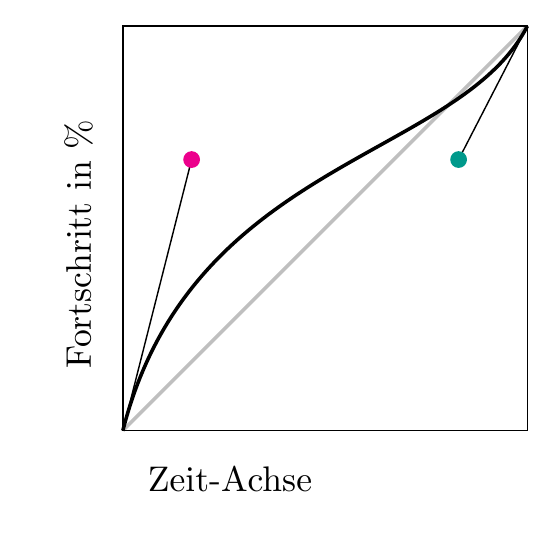
To visualize an example for cubic-Bezier CSS animations (http://cubic-bezier.com) I decided to try TikZ. That was in fact a pretty good idea, as — with the help of Google (and mostly tex.stackexchange.com) I managed to complete the following example in just a few minutes:
\documentclass{article} \usepackage[paperwidth=5.5cm,paperheight=5.3cm,left=0cm,right=0cm,bottom=0cm,top=0.25cm]{geometry} \usepackage{tikz} \definecolor{fom}{RGB}{0,153,139} \begin{document} \begin{tikzpicture}[x=4cm,y=4cm] \draw[line width=1pt,lightgray] (0,0) -- (1,1); % gray line for the linear animation path \draw (0,0) -- (1,0) -- (1,1) -- (0,1) -- (0,0); % frame \draw (0,0) -- (0.17,0.67); % (0,0) to 2. point \draw (1,1) -- (0.83,0.67); % (1,1) to 3. point \draw [magenta,fill=magenta](0.17,0.67) circle (.5ex); %circle 1 \draw [fom,fill=fom](0.83,0.67) circle (.5ex); % circle 2 \draw[line width=1pt] (0,0) .. controls (0.17,0.67) and (0.83,0.67) .. (1,1); % cubic bezier curve % labels \node[label={[label distance=0.0cm,text depth=-1ex,rotate=90]left:Fortschritt in \%}] at (-0.1,.8) {}; \node[label={[label distance=0.0cm,text depth=-1ex]right:Zeit-Achse}] at (0,-0.1) {}; \end{tikzpicture} \end{document} |
The result is pretty impressive.