2015-03-22, 19:52
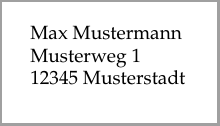
Today I purchased a Dymo 450 label printer. Of course I want to be able to print my labels from LaTeX, so I quickly created a test document.
Important: the correct label size must be set in the printer dialogue.
% For the 11354 label
\documentclass[14pt,ngerman]{scrartcl}
\usepackage[left=7.5mm,right=2mm,top=5mm,bottom=5mm,%
paperwidth=57mm, paperheight=32mm]{geometry}
\usepackage[utf8]{inputenc}
\usepackage[T1]{fontenc}
\usepackage{babel}
\usepackage{palatino}

\setlength{\parindent}{0pt}
\setlength{\parskip}{0pt}

\begin{document}

Max Mustermann \\ Musterweg 1 \\ 12345~Musterstadt

\end{document} |
% For the 11354 label
\documentclass[14pt,ngerman]{scrartcl}
\usepackage[left=7.5mm,right=2mm,top=5mm,bottom=5mm,%
paperwidth=57mm, paperheight=32mm]{geometry}
\usepackage[utf8]{inputenc}
\usepackage[T1]{fontenc}
\usepackage{babel}
\usepackage{palatino}
\setlength{\parindent}{0pt}
\setlength{\parskip}{0pt}
\begin{document}
Max Mustermann \\ Musterweg 1 \\ 12345~Musterstadt
\end{document}
Uwe Ziegenhagen likes LaTeX and Python, sometimes even combined.
Do you like my content and would like to thank me for it? Consider making a small donation to my local fablab, the Dingfabrik Köln. Details on how to donate can be found here Spenden für die Dingfabrik.
More Posts - Website
